
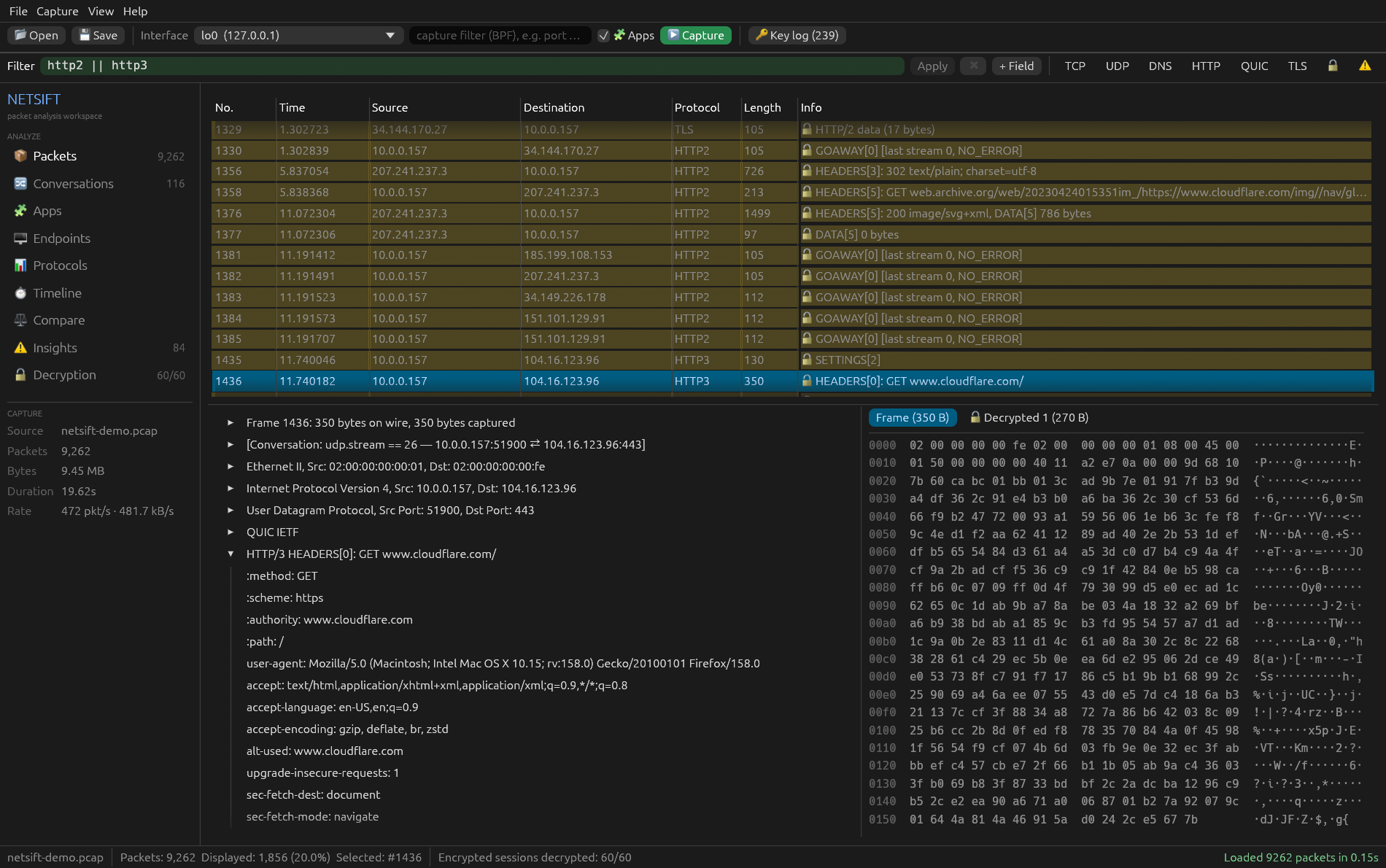
From packets to answers
Open a capture or start one, narrow it down with a filter, then dig in: conversations, apps, a request waterfall, automatic insights and readable HTTP.
Which app sent it
Every connection is attributed to the local process that owns it, during live capture and without root for your own apps. Filter with process == "firefox".
HTTPS, HTTP/2 and HTTP/3, decrypted
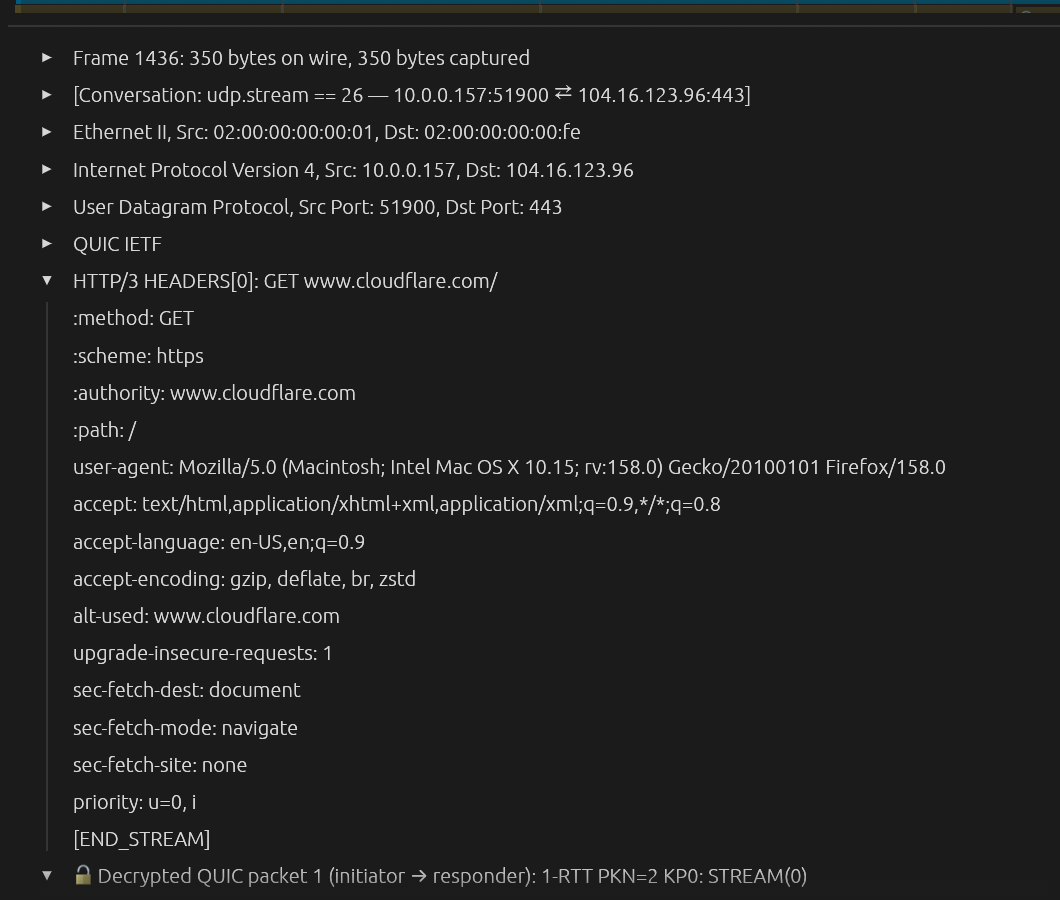
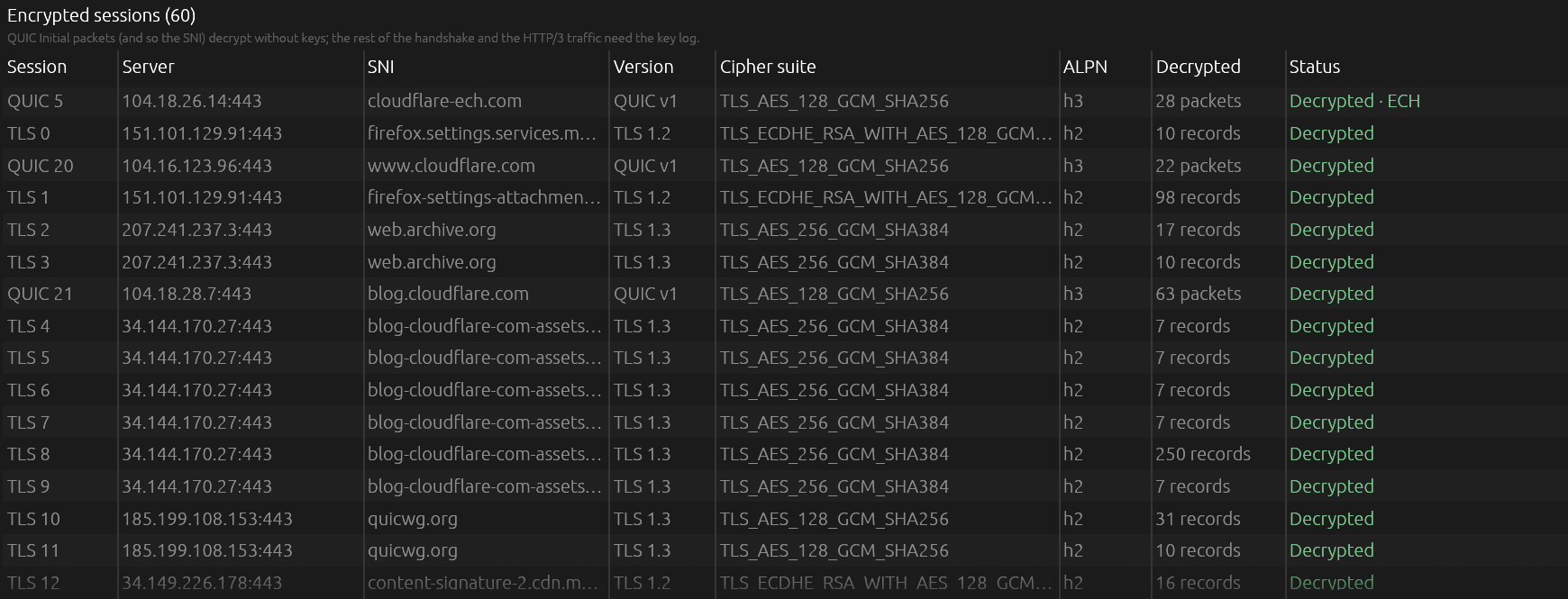
TLS 1.2 and 1.3, QUIC v1 and v2 with key updates and Encrypted Client Hello, HPACK and QPACK header decoding, from a standard SSLKEYLOGFILE.
One-click browser decryption
Launch Firefox or Chrome with key logging from the 🔑 menu. NetSift loads the keys and starts capturing; requests decrypt as you browse.
Request waterfall
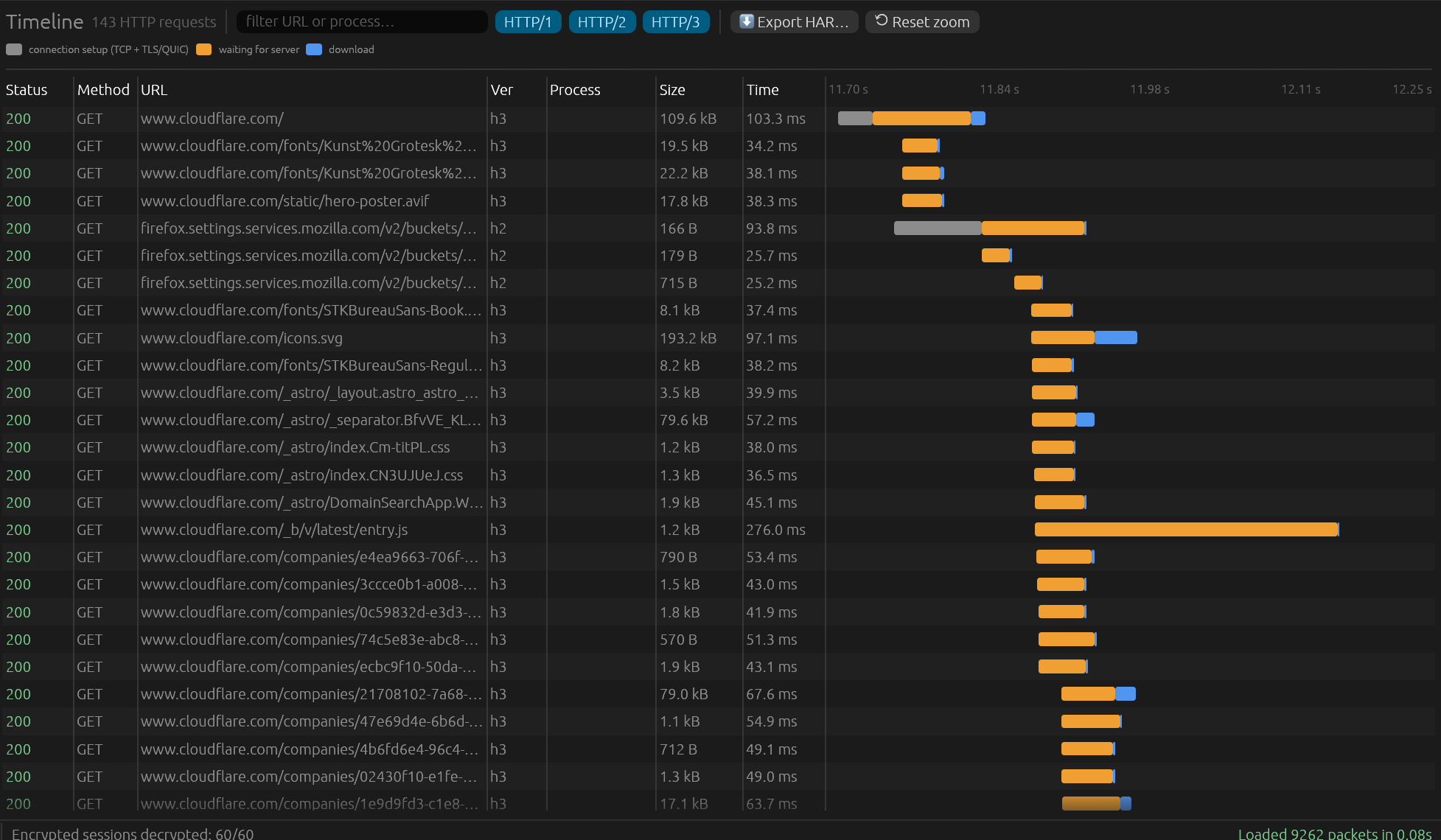
Every HTTP/1, /2 and /3 request with connection setup, server wait and download, like browser devtools. Zoom by dragging; export to HAR.
Compare two captures
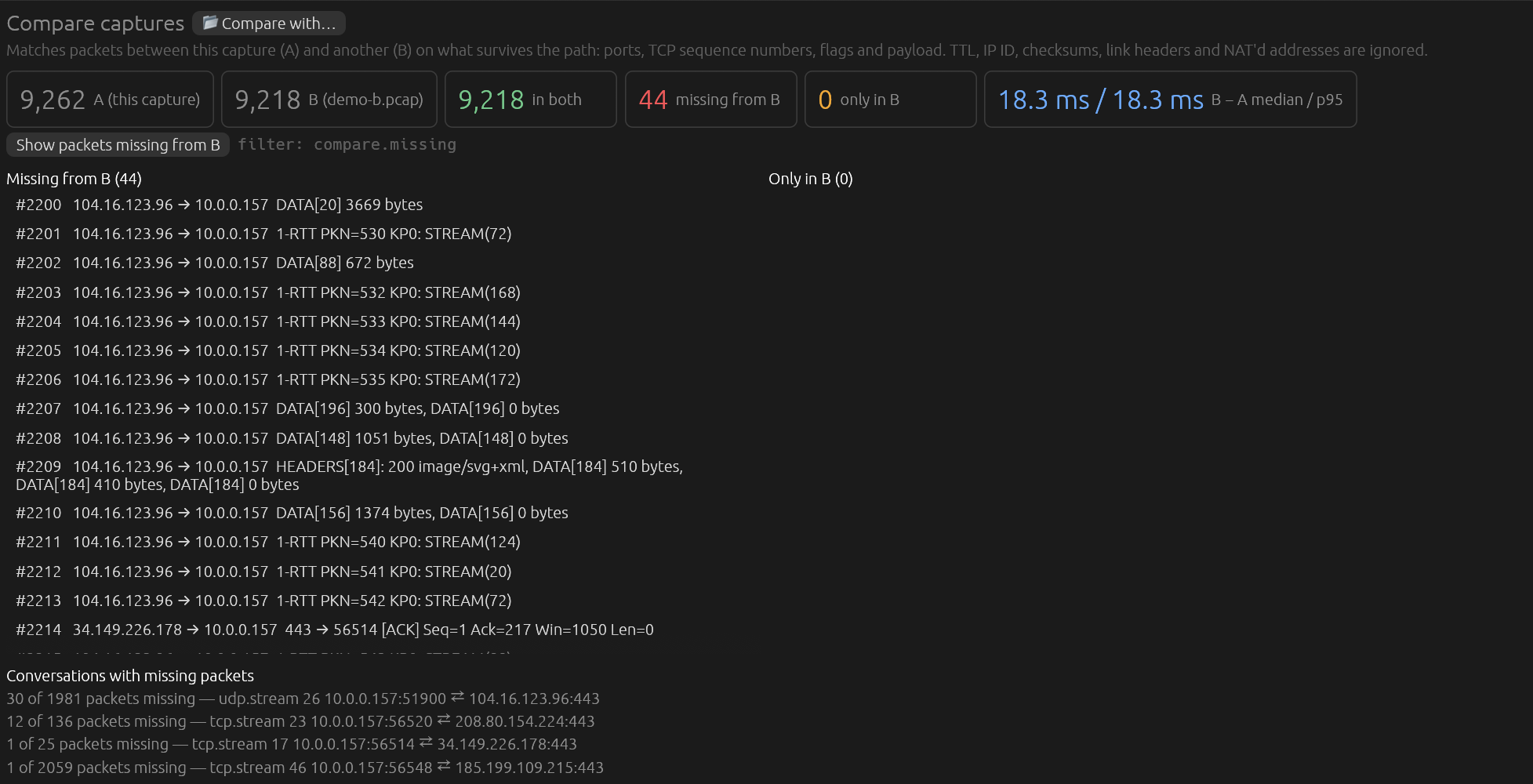
Client side vs server side: what never arrived, what appeared, and the delay between capture points. TTL, IP ID, checksums and NAT are ignored.
Instant search
Filters over a million packets return in milliseconds, using every core. Wireshark-style syntax: tls.sni contains "github", ip.addr == 10.0.0.0/8.
Insights
Retransmissions, resets, zero windows, DNS failures, HTTP errors and TLS alerts, grouped and one click from the packet.
Follow streams as messages
Raw bytes, decrypted TLS, or HTTP/2 and HTTP/3 as readable request and response headers and bodies.
Headless CLI
netsift query, sessions, http, har and diff for scripts and pipelines, with -w to save matching packets.
Which app sent that packet?
During a live capture NetSift asks the operating system which process owns each connection, so traffic is grouped by app with the hosts it talked to. Earlier packets of a connection are labelled too.

/proc. Without root you see your own apps (browsers, curl, editors); run as root to include system services. Wireshark can display process information only when a capture file already contains it.Read HTTPS, HTTP/2 and HTTP/3
Browsers, curl, OpenSSL, BoringSSL, NSS and rustls can write their TLS secrets to a key log. Point NetSift at it, or let the 🔑 menu set it up, and sessions decrypt live as keys appear.
- TLS 1.3 and 1.2: AES-GCM and ChaCha20-Poly1305, including TLS 1.3 key updates.
- QUIC v1 and v2: header protection, coalesced packets, 1-RTT key updates. Initial packets decrypt without any key, so every QUIC connection's server name is visible.
- Encrypted Client Hello: finds the keys logged under the hidden inner ClientHello.
- HTTP/2 and HTTP/3: HPACK and QPACK, including dynamic tables, decoded per connection and filterable with
http.host,http.request.methodandhttp.response.code.
Every request as a waterfall
The Timeline turns HTTP/1, /2 and /3 traffic, plain or decrypted, into the view you know from browser devtools: connection setup, waiting for the server, and download. Drag the time axis to zoom; click a request to jump to its packets; export the whole thing as a HAR file.
Diff two captures
Capture on both sides of a firewall, proxy or load balancer, then compare: NetSift matches packets on ports, TCP sequence numbers, flags and payload, and shows what's missing, what's new and how long each packet took. compare.missing filters straight to the lost packets.
Fast where it counts
A 1.03 million packet, 1 GB capture built from real Firefox traffic, on an Apple M4 Pro, against tshark 4.6.8 running the same filters.
| NetSift | tshark | |
|---|---|---|
| Each search after loading | 8–73 ms | 4.1–5.3 s (re-reads the file) |
| Load + search, decrypting HTTPS and HTTP/3 | 7.2–7.5 s | 11.0–11.7 s |
| Load + search, no decryption | 5.4–5.9 s | 4.1–5.3 s |
| Peak memory | 3.2 GB (5.7 GB decrypting) | 1.0 GB (2.2 GB) |
Install with one command
Use the command for your system at the top of the page. No Rust, package manager or administrator rights needed.
macOS 11 or newer
Installs NetSift.app into Applications. One universal app for Apple Silicon and Intel Macs. Live capture uses /dev/bpf*: if Wireshark's ChmodBPF helper is installed it just works, otherwise the installer prints the one command to allow it.
Linux
Installs to ~/.local/bin/netsift with an app-menu entry. x64 and ARM64, glibc 2.35+ (Ubuntu 22.04, Debian 12, Fedora 36 and later). Needs libpcap; for live capture, grant cap_net_raw once with the setcap command the installer prints.
Windows
Coming soon: the Windows build needs Npcap and isn't released yet. Capture files from Windows machines open fine on macOS and Linux.
gh attestation verify <file> -R Nyanites/netsift. Read the script first if you like: install.sh.Frequently asked questions
How do I decrypt HTTPS?
The easiest way: open the 🔑 menu and choose Launch Firefox with decryption (or Chrome). NetSift starts the browser with its own profile and key logging, loads the keys and starts capturing. Otherwise set SSLKEYLOGFILE=/path/to/keys.log before starting any browser or tool that supports it, and load that file from the 🔑 menu. NetSift re-reads it whenever it changes.
Why does live capture need permission?
Operating systems only let privileged programs read raw network traffic. On macOS that's /dev/bpf*, which Wireshark's ChmodBPF helper opens to the access_bpf group; on Linux it's the CAP_NET_RAW capability. NetSift never needs to run as root, and opening capture files needs no permission at all.
How does it compare with Wireshark?
Wireshark dissects thousands of protocols and remains the reference. NetSift focuses on the everyday workflow: modern web traffic (HTTP/2, HTTP/3, QUIC, ECH) decrypted with little setup, which app sent what, request waterfalls with HAR export, capture diffs, and instant re-filtering. Use both: NetSift reads and writes standard pcap files.
Is it safe to open captures from untrusted networks?
NetSift treats every packet as hostile input: dissectors are bounds-checked, the TLS, QUIC, HTTP/2, HPACK and QPACK parsers are fuzzed with random and mutated traffic, and a packet that can't be read is marked malformed instead of crashing. Report bugs privately through GitHub security advisories.
Does NetSift send my data anywhere?
No. There's no telemetry, no account and no update check. Key logs and captures stay on your machine. The only network traffic NetSift causes is a browser you launch yourself from the 🔑 menu.
Is NetSift free?
NetSift is free for small teams: organizations with fewer than 100 people and under US$1M in revenue, under the PolyForm Small Business License. Larger organizations need a commercial license.
How do I uninstall it?
macOS: drag NetSift from Applications to the Trash. Linux: delete ~/.local/bin/netsift, ~/.local/share/applications/netsift.desktop and ~/.local/share/icons/hicolor/256x256/apps/netsift.png.
Source-available, free for small teams
NetSift is published under the PolyForm Small Business License 1.0.0. The full source is on GitHub.
Free
For organizations with fewer than 100 people and under US$1M in annual revenue (2019 dollars, inflation-adjusted).
Commercial license
Larger organizations need a commercial license. Get in touch for terms.